Airport transfer bookings rarely come through one channel. You may receive reservations from OTAs, hotel reception teams, travel agents, DMCs, corporate clients, your website, and direct enquiries, sometimes all within the same day.
More booking sources can mean more revenue. But they can also create more operational work.
If your team has to copy passenger names, flight numbers, pickup times, vehicle requirements, and destinations manually into your dispatch system, every new booking source creates another opportunity for delays or errors.
Airport transfer booking automation solves this by connecting supported external booking sources with a central booking or dispatch system. Reservation data can then be validated, converted into an operational trip, and prepared for dispatch with less manual re-entry.
The goal is simple: automate airport transfer bookings without losing control over how each trip is handled.
Why Managing Airport Transfer Bookings Manually Becomes a Problem
The challenge is not necessarily booking volume. It is the number of different workflows behind those bookings.
An OTA might provide structured booking data. A hotel may send a reservation through a portal or booking form. A travel agent might send dozens of transfers together in a spreadsheet or manifest.
Your operations team then has to turn all of them into usable trips.
One Operation, Multiple Booking Sources
Without a centralised workflow, your staff can become the human integration layer between every booking source and your dispatch operation.
They may need to open an OTA portal, check hotel requests, download a travel agent manifest, monitor emails, and then manually enter everything into the booking system.
As volume grows, so does the risk of entering the wrong pickup time, missing a flight number, selecting the wrong vehicle category, creating duplicate trips, or overlooking a cancellation.
The better approach is not to restrict where bookings come from. It is to standardise what happens after you receive them.
What Is Airport Transfer Booking Automation?
Airport transfer booking automation is the process of transferring reservation information from external booking channels into a central airport transfer booking system with minimal manual data entry.
A simplified workflow looks like this:
Booking Source → Integration or Import → Validation → Trip Creation → Dispatch
The connection method can differ depending on the source. It may involve a direct API, aggregator connection, partner portal, structured data feed, manifest upload, or another supported integration method.
That distinction matters. Automation does not mean every OTA, hotel, or travel agency connects in exactly the same way.
The objective is to create a reliable flow in which external booking information becomes structured operational data your team can actually use.
How to Automate Airport Transfer Bookings From Different Sources
To automate airport transfer bookings effectively, first understand how each source provides reservation data. You can then determine the appropriate integration or import workflow.
Automating Bookings From OTAs and Aggregators
OTAs and transfer aggregators can provide an important source of demand for airport transfer businesses.
Where a supported integration is available, the workflow can look like this:
Passenger books → OTA or aggregator sends reservation → booking data enters your system → details are validated → trip is created → dispatch workflow begins
The information required may include:
-
External booking reference
-
Passenger name and contact details
-
Pickup date and time
-
Airport and terminal
-
Flight number
-
Drop-off location
-
Vehicle category
-
Passenger and luggage count
-
Fare information
-
Special instructions
An OTA integration for airport transfers therefore needs to do more than create a blank booking. It needs to preserve enough information for your team to fulfil the trip correctly.
API availability, supported fields, modification handling, and other capabilities can differ between partners, so these should be verified before implementing an integration.
Expert Tip:
Before connecting an OTA or aggregator, map the complete booking lifecycle, not just booking creation. Confirm whether the integration supports amendments, cancellations, acknowledgements, fare updates, and status callbacks. An integration that only creates trips can still leave your operations team handling critical changes manually.
Automating Hotel Airport Transfer Bookings
Hotels create a different operational scenario.
A reception or concierge team may arrange airport pickups for arriving guests, departure transfers, VIP passengers, or groups. If every request is handled through phone calls or emails, your reservation team still has to convert those requests into trips manually.
A connected hotel workflow can instead follow:
Hotel or Reception → Booking Request → Central System → Validation → Trip Creation → Dispatch
The booking should ideally retain information about the hotel or account that generated it. That makes it easier to manage service instructions, pricing rules, billing, and reporting.
For operators serving multiple hotels, this becomes particularly valuable because you can grow partner bookings without creating an equally large manual reservation workload.
Automating Travel Agent and DMC Bookings
Travel agencies and destination management companies can create another challenge: bulk volume.
You might receive individual reservations, but you may also receive a manifest containing dozens or hundreds of future transfers.
Entering every passenger manually is inefficient and increases the possibility of data-entry errors.
Depending on the partner and available technology, travel agent airport transfer bookings may be handled through APIs, partner portals, structured files, bulk booking tools, or manifest imports.
A typical workflow becomes:
Travel Agent or DMC → API/Manifest → Data Validation → Trip Creation → Scheduling → Dispatch
This allows your operations team to focus on exceptions rather than recreating every reservation from scratch.
What Booking Information Needs to Be Automated?
A booking is only useful when it contains enough information to operate the transfer.
| Booking data | Why you need it |
|---|---|
| Booking/reference ID | Track the external reservation |
| Passenger details | Identify and contact the traveller |
| Pickup date and time | Schedule the transfer |
| Airport and terminal | Coordinate the pickup |
| Flight number | Support flight-aware operations |
| Destination | Plan the journey |
| Vehicle category | Allocate an appropriate vehicle |
| Passenger/luggage count | Check vehicle capacity |
| Fare/account information | Support pricing and billing |
| Special instructions | Handle service requirements |
This is why airport transfer API integration should be evaluated around data quality, not simply whether two platforms can technically connect.
The information must remain usable throughout pricing, scheduling, dispatch, service delivery, and reporting.
Expert Tip:
Use the external booking reference as a persistent identifier across trip creation, updates, cancellations, and reconciliation. Without a stable source ID, the same passenger reservation can be duplicated or become difficult to match when an OTA or travel agent sends an amendment later.
What Happens After an External Booking Enters the System?
Getting a reservation into your software is only the beginning.
A good airport transfer booking software workflow needs to turn that reservation into an operational trip.
Validate the Booking
Before dispatching the ride, the system or operations team needs to determine whether the necessary information is present.
That could include checking the pickup time, passenger details, flight information, requested vehicle, service location, and external booking reference.
Validation is especially important when bookings originate outside your own platform because you do not necessarily control how the original data was entered.
Apply Pricing and Operational Rules
The booking may then need to follow your own business rules.
Depending on your setup, those could include vehicle eligibility, service zones, account-specific conditions, fare rules, or scheduled-booking requirements.
External demand should not mean surrendering operational control.
Prepare the Trip for Dispatch
Once validated, the reservation becomes a trip that can enter your normal dispatch workflow.
This is where booking automation and dispatch automation need to be distinguished.
Booking automation gets the reservation into your operational environment correctly. Automated dispatching determines how that trip should be assigned to an eligible driver or vehicle.
Together, they remove two different manual bottlenecks.
How Should Changes, Cancellations and Booking Exceptions Be Handled?
A common mistake is to think automation ends when the trip is created.
Real airport bookings change.
Flights are rescheduled. Passengers update pickup details. Vehicle requirements change. Travel agents amend reservations. Some bookings get cancelled completely.
Your real booking lifecycle is therefore:
Create → Validate → Confirm → Modify → Dispatch → Complete → Reconcile
Booking Modifications and Cancellations
Where supported by the external platform and integration, booking updates can be synchronised with your operational system.
The exact capability depends on the source. Never assume that because an integration can create bookings, it can automatically handle every amendment or cancellation.
That needs to be verified during integration planning.
Exception Handling
Automation also needs a path for bookings that cannot safely proceed.
For example:
Missing flight number → Flag for review
Duplicate external booking ID → Prevent duplicate trip
Unsupported vehicle requirement → Dispatcher intervention
Incomplete passenger information → Validation exception
Good automation does not eliminate human control. It eliminates repetitive work so your team can spend its time handling the exceptions that genuinely require judgement.
From Booking Source to Dispatch: What an Automated Workflow Looks Like
A well-designed airport transfer operation can reduce multiple booking channels into one consistent process:
1. Receive
Accept the reservation from an OTA, hotel, travel agent, DMC, or other supported booking channel.
2. Standardise
Convert incoming information into the fields your operation requires.
3. Validate
Check passenger, flight, vehicle, location, and booking information.
4. Create
Turn the reservation into an operational trip.
5. Dispatch
Assign or broadcast the ride according to your dispatch rules.
6. Track and Update
Manage trip progress and supported booking changes.
7. Reconcile
Retain source and booking-reference information for reporting and commercial processes.
The real value is not simply faster data entry. It is creating one operational workflow from multiple demand sources.
What to Look for in Airport Transfer Booking Software
If third-party bookings are important to your business, evaluate airport transfer software around the entire booking lifecycle rather than checking whether it has an API.
Look for the ability to support:
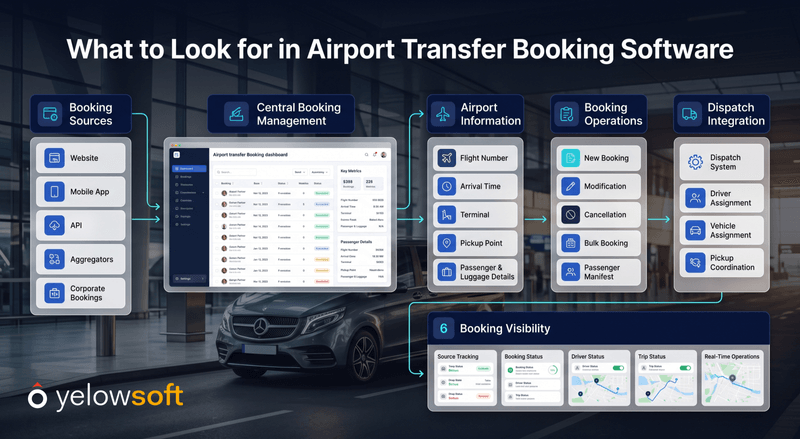
Multi-Source Booking Management
Your direct and supported third-party booking channels should feed into a manageable operational environment.
API and Aggregator Integrations
Check what information each integration can receive, create, update, and return.
Bulk and Manifest Booking
If you work with DMCs, tour operators, or large travel partners, determine whether you can import multiple bookings efficiently.
Modification and Cancellation Handling
Ask what happens after a booking changes. This is just as important as initial trip creation.
Airport-Specific Information
Your system should be capable of retaining relevant details such as flight information, airport pickup data, scheduled times, and service instructions.
Dispatch Integration
A validated booking should be able to move naturally into your dispatch workflow rather than creating another operational silo.
Booking-Source Visibility
You should know where trips originated so you can monitor partner activity and operational performance.
How Yelowsoft Helps Centralise Airport Transfer Bookings
Yelowsoft is designed to help passenger transportation businesses bring different booking and operational workflows into a connected environment.
For airport transfer operators, that can include capabilities around aggregator integrations, APIs, bulk and manifest booking, trip management, dispatch automation, driver and fleet operations, and reporting.
The bigger advantage is centralisation.
Instead of treating an OTA booking, hotel reservation, travel-agent manifest, and direct booking as completely separate operational processes, you can bring supported channels into a more consistent booking-to-dispatch workflow.
Specific third-party integration capabilities, data fields, update handling, and partner requirements should always be confirmed for the integration you plan to use.
More Booking Channels Should Not Mean More Booking Chaos
OTAs, hotels, travel agents, and DMCs can help you reach more passengers and build valuable B2B demand. But that growth becomes difficult to manage when every additional booking creates another manual task for your reservation or dispatch team.
The better model is to centralise, validate, create, dispatch, track, and reconcile bookings through a connected workflow.
That allows you to expand your booking network without turning your operations team into the integration layer between every partner and your dispatch system.
With the right airport transfer software, you can spend less time recreating reservations and more time ensuring every transfer is handled correctly.
Turn Third-Party Airport Bookings Into Dispatch-Ready Trips
See how Yelowsoft can help you centralise bookings and simplify airport transfer operations.
Book a Demo Now
FAQ's
Airport transfer companies can automate OTA bookings by connecting supported OTA or aggregator platforms with their booking system through APIs or other integration methods. Reservation information can then be validated and converted into operational trips without manually recreating every booking.
Yes, where an appropriate hotel booking portal, API, booking interface, or supported integration exists. The booking can enter the central system with relevant passenger and trip information before moving into the operator's dispatch workflow.
Travel-agent bookings can be received through APIs, portals, structured files, bulk booking tools, or manifest imports depending on the partner workflow. Bulk processing is particularly useful when agencies provide large numbers of scheduled airport transfers.
It should transfer the information required to fulfil the ride, such as booking ID, passenger details, pickup time, airport or terminal, flight number, destination, vehicle requirements, fare information, and relevant service instructions.
They can be automated or synchronised when the external booking platform and integration support those actions. Operators should verify modification and cancellation capabilities separately rather than assuming they are included because new bookings can be imported.
Yes. A central airport transfer booking system can consolidate supported direct and third-party booking channels so your team can manage trips through a more consistent operational workflow.


