Imagine landing at an airport in a new city. You don't have any taxi apps on your phone. You're not sure which taxi company to call. You just want a quick, easy ride to your hotel. This is exactly the problem that taxi booking kiosks solve.
Self-operating kiosks are touch-screen machines that let passengers book cabs without apps, phone calls, or waiting in long queues. Simply walk up, enter your destination, and book a ride in under 60 seconds. These kiosks are popping up at airports, malls, hotels, and bus stations worldwide because they make taxi booking incredibly simple for everyone.
According to a report by Fortune Business Insights, the global kiosk market reached USD 22.69 billion in 2021 and is projected to grow to USD 51.05 billion by 2028—showing just how rapidly businesses are adopting this technology. For taxi companies, kiosks represent a cost-effective way to capture more customers and increase bookings without expensive apps or call centers.
In this guide, you'll learn what taxi booking kiosks are, how they work, where they can be used, and how they can create an additional booking channel for taxi operators and their venue partners.
What is a Taxi Booking Kiosk?
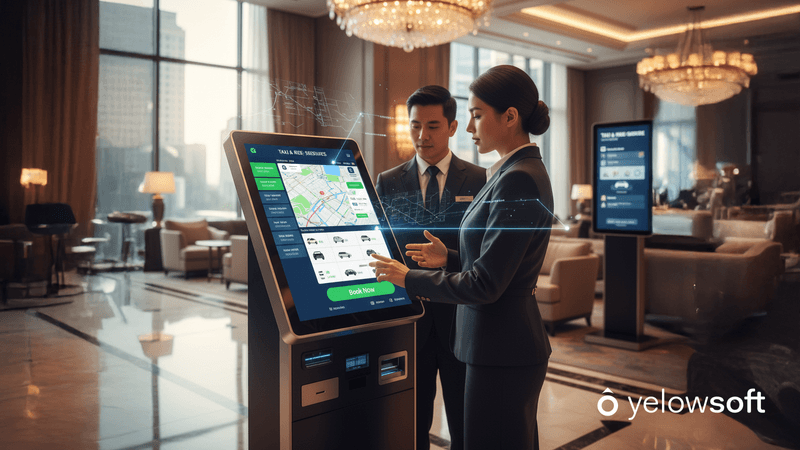
A taxi booking kiosk is a self-service or venue-based booking interface that allows ride requests to be created without requiring passengers to download an app. Depending on the setup, it can be made available through a dedicated device or a web-based interface used by hotels, receptions, resorts, and other partner locations.
The booking interface connects with the taxi operator's booking and dispatch workflow. Once a ride request is submitted, it can enter the dispatch system for driver assignment and trip management without requiring venue staff to re-enter the booking manually.
How Does It Work? (4 Simple Steps)
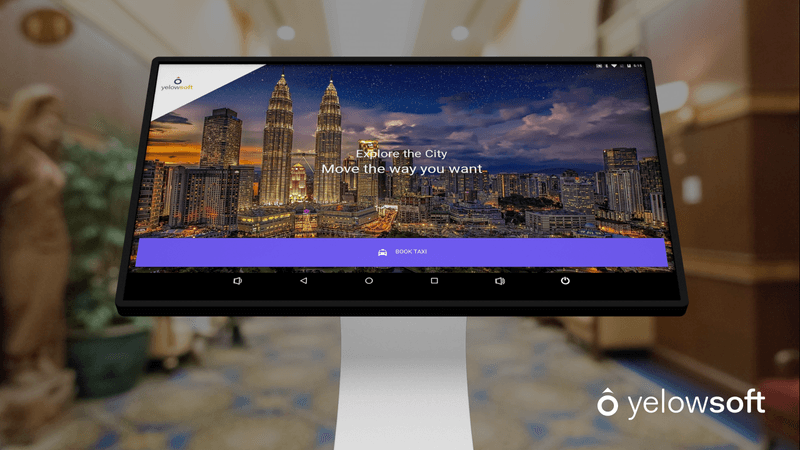
Step 1: Enter Your Trip Details
The passenger touches the screen and types in where they want to go. The interface is designed to be super simple—large buttons, clear instructions, and easy navigation. Anyone can use it, even if they've never used a touchscreen before.
Step 2: Choose Your Ride Type
The kiosk shows different car options: standard taxi, larger vehicle for groups, or premium car. Passengers pick what they need and see the estimated price right away—no surprises.
Step 3: Request is Sent to Driver
Once the passenger confirms the booking, automated dispatching can use booking and driver information to move the request into the appropriate assignment workflow.
Step 4: Pick Up & Ride
Depending on the configured communication workflow, passengers can receive trip updates or a tracking link that helps them follow the assigned driver and estimated arrival.
Where Should You Install Taxi Kiosks?
Location makes all the difference. Airport taxi kiosks, hotel taxi kiosks, and kiosks at shopping centers perform best because these places have constant foot traffic from people actively looking for rides.
Airports: The #1 Best Location
Airports are perfect for taxi booking kiosks. Travelers landing in new cities often don't have local taxi apps installed and may not know which company to call. A clearly visible kiosk in the arrivals area makes booking effortless.
For airport transfer operators, venue-based bookings become even more useful when they connect with scheduled transfers, driver dispatch, flight-related pickup workflows, and partner bookings within the same system.
International tourists especially benefit since they may not speak the local language well. Kiosks with multiple language options let them book rides without communication barriers.
According to research by Movability, booking kiosks in high-traffic areas can reduce taxi trip costs by over 60% by minimizing driver idle time and creating competitive pricing.
Hotels and Resorts
Hotels generate constant taxi demand. Guests need rides to restaurants, tourist attractions, business meetings, and back to the airport. A kiosk in the hotel lobby makes bookings instant and convenient.
A web-based hotel taxi booking interface can also let reception or concierge teams create guest rides directly without relying on phone calls between the venue and taxi dispatcher.
Hotels love this partnership because it solves a service need without requiring their staff to make calls or manage bookings. Many hotels place kiosks right next to their front desk as an added guest amenity.
Shopping Malls
Shoppers spend hours at malls and often need rides home, especially when carrying heavy bags or shopping with family. A self-service taxi kiosk near the main exit captures these customers right when they're ready to leave.
Malls benefit from happier customers who have easy transportation options, making them more likely to visit and shop longer.
Restaurants and Bars
Bars and restaurants face a serious safety issue: drunk driving. By installing kiosks at popular nightlife spots, taxi companies actively help reduce drunk driving incidents while building strong business partnerships.
Many establishments now partner with taxi companies to provide safe ride-home options for their customers. Some bars even offer ride discounts as part of their responsible service programs.
Train and Bus Stations
People arriving via train or bus often need onward transport to their final destination. Kiosks at transit hubs capture this demand efficiently, especially for passengers unfamiliar with the area or traveling with luggage.
Key Features and Technology
Modern taxi kiosk systems pack impressive technology into user-friendly interfaces. Here's what makes them work:
Touchscreen Interface
Large, responsive touchscreens (typically 21-27 inches) make navigation simple. Clear buttons, bright displays, and intuitive design mean anyone can book a ride in seconds—no instructions needed.
Multi-Language Support
Multilingual support can be particularly valuable in airports, hotels, and tourist-heavy locations, helping international passengers or venue staff complete bookings in a supported language they understand.
Real-Time GPS Tracking
When the booking workflow is connected with live driver tracking, operators or venue staff can monitor the assigned driver's location, trip progress, and ETA. Passengers can also be kept informed through configured trip updates or tracking links.
Payment Options
Payment availability depends on the booking configuration and the payment integrations enabled by the taxi operator. A venue booking workflow may support online payments, configured payment methods, corporate billing, or pay-on-arrival options depending on the use case.
Operators should confirm supported payment methods and hardware requirements before deploying a kiosk or venue booking setup.
SMS and Email Confirmations
Every booking generates instant confirmation via SMS containing:
-
Driver name and phone number
-
Vehicle make, model, and license plate
-
Real-time tracking link
-
Estimated arrival time
-
Booking reference number
Emergency Features
Physical kiosk deployments may include venue-specific safety or assistance features, but these depend on the hardware provider and installation rather than the booking software itself.
Accessibility Options
Accessibility requirements should be considered when choosing the device, placement, and booking interface.
Physical features such as screen height or mounting depend on the hardware provider, while interface-level accessibility should be evaluated during configuration and testing.
Benefits for Taxi Businesses
Installing self-operating kiosks delivers measurable business advantages that justify the investment quickly.
Capture Customers Without Apps
Not everyone has the time to download taxi apps. According to research, 66% of consumers actually prefer self-service kiosks over traditional service counters because they're faster and more convenient.
Kiosks let you serve these customers who would otherwise call competitors or use different transport options. You're capturing market share that was previously inaccessible.
Create an Additional Booking Channel
A venue booking channel gives your taxi business another way to capture demand from passengers who may not have your app or know your phone number. Hotels, airports, receptions, and other partner venues can become additional sources of bookings rather than disconnected referral points.
Kiosks work 24/7 without breaks, sick days, or vacations. They process bookings instantly during peak hours when human dispatchers would be overwhelmed.
Reduce Operating Costs
Airport taxi kiosk installations eliminate the need for staff at booking desks. Venue-based booking can reduce repetitive coordination between passengers, reception staff, and dispatch teams.
When bookings enter the system digitally, operators can reduce manual data entry and allow dispatchers to focus on assignment, exceptions, and active trip management.
24/7 Availability
Kiosks never sleep. They capture late-night arrivals, early morning travelers, and off-peak bookings that would otherwise go to competitors. This round-the-clock operation maximizes your revenue potential.
Build Brand Visibility
A well-branded kiosk acts like a permanent billboard in high-traffic locations. Thousands of people see your company name, logo, and services daily—even those not currently booking rides.
This constant visibility builds brand recognition. When someone eventually needs a taxi, they remember seeing your kiosks everywhere and are more likely to choose your service.
Form Strategic Partnerships
Hotels, malls, and airports actively seek taxi partnerships that enhance customer experience. Offering to install free kiosks creates win-win relationships:
-
Venues get improved guest services without managing bookings
-
You get exclusive access to high-value customers
-
Both parties benefit from shared marketing opportunities
For operators working with hotels, travel agents, corporate clients, and other booking partners, a structured partner booking workflow can centralise these requests instead of relying on calls, emails, or manual re-entry.
Many taxi companies negotiate preferential placement or exclusive rights in exchange for providing kiosks, creating competitive moats against rivals.
Generate Additional Revenue
Depending on the commercial agreement between the taxi operator and venue, kiosk or partner-booking deployments may also support broader partnership opportunities. These arrangements sit outside the booking software itself.
Advertising Space: Display partner advertisements on idle screens (restaurants, hotels, tourist attractions) and charge monthly fees.
Premium Placement Fees: Charge venues for installing kiosks in their locations, or negotiate commission sharing on bookings generated.
Data Insights: Analyze booking patterns, popular destinations, and peak times to optimize pricing and fleet allocation—improving profitability across your entire operation.
Benefits for Passengers
While business benefits matter most to operators, passenger advantages drive actual usage and adoption.
Super Fast Booking
A well-designed booking interface reduces unnecessary steps between the passenger's transport need and the ride request. It can be especially useful for travellers who do not want to download an app or wait while venue staff contact a taxi company manually.
No App Downloads Required
Tourists and occasional riders don't want apps cluttering their phones. Kiosks serve this huge market segment that prefers instant, no-commitment booking.
See Prices Before Booking
Transparent upfront pricing eliminates the anxiety of unknown fares. Passengers see exact costs (or reliable estimates) before confirming, building trust and reducing disputes.
Track Your Ride in Real-Time
SMS tracking links let passengers see their driver's location and arrival time—providing the same transparency as popular ride-hailing apps without requiring app installation.
Payment Flexibility
The payment experience can be configured around the operator's supported payment methods and integrations. Depending on the setup, this may include online payment, account-based billing, or payment on arrival.
Accessible to Everyone
Unlike smartphone apps that exclude elderly passengers, those with limited tech skills, or people with visual impairments, kiosks offer simple interfaces anyone can navigate successfully.
Setting Up Your Taxi Kiosk System
Implementation is simpler than most operators expect. Modern taxi kiosk software integrates seamlessly with existing dispatch systems.
Step 1: Choose Locations
Identify high-traffic areas where people actively need rides: airport terminals, hotel lobbies, mall exits, transit stations.
Step 2: Secure Venue Agreements
Negotiate partnerships with property owners. Emphasize how kiosks enhance their customer experience while requiring no work from their staff.
Step 3: Decide Between a Physical Kiosk and Web-Based Venue Interface
Decide how the booking experience will be made available at the venue. Some operators may use dedicated kiosk hardware, while others can provide a web-based booking interface to hotel, reception, resort, or partner staff.
If physical hardware is required, device specifications and installation should be handled with the appropriate hardware provider.
Step 4: Integrate with Dispatch System
Connect the booking interface with your taxi dispatch software so venue-generated ride requests enter the same operational workflow as bookings from your other channels. This keeps booking details, driver assignment, trip status, and dispatch visibility connected.
Step 5: Brand and Customize
Design kiosk screens with your branding, colors, and messaging. Configure the available branding, booking fields, vehicle options, payment workflow, and supported language settings according to your deployment and venue requirements.
Step 6: Install and Test
Before launch, test the complete booking workflow from ride creation through dispatch. Verify booking fields, pricing, notifications, payment flow where applicable, driver assignment, and trip-status updates.
Step 7: Launch and Monitor
Go live and track performance metrics: bookings per day, popular times, technical issues, customer feedback. Optimize based on real usage data.
Training Required: Minimal
Kiosks are self-explanatory for passengers. Your drivers need zero additional training—rides appear in their system like any other booking.
Conclusion
Taxi booking kiosks and web-based venue booking interfaces give operators another way to capture rides from airports, hotels, resorts, receptions, transit locations, and other high-demand venues without forcing every passenger to download an app.
The real value comes from what happens after the booking is created. When venue-generated requests connect directly with your booking and dispatch workflow, your team can manage driver assignment, trip status, customer updates, and operational visibility without repeatedly transferring booking information between systems.
Before implementing a kiosk strategy, decide whether you actually need dedicated physical hardware or whether a web-based venue interface can meet the same operational need. Then evaluate dispatch integration, supported booking fields, payments, multilingual requirements, tracking, connectivity, accessibility, and venue workflows before deployment.
For taxi operators building hotel, airport, or partner networks, the goal should not simply be to install another screen. It should be to create a reliable booking channel that connects venue demand directly with your transport operation.
Turn Hotel and Partner Bookings Into Dispatch-Ready Rides With Yelowsoft
FAQ's
The booking interface sends ride details into the operator's booking and dispatch workflow, where the request can be priced, assigned to a driver, tracked, and managed alongside other bookings.
No. A kiosk or web-based venue booking interface can create a ride without requiring the passenger to download a taxi app.
Yelowsoft provides web-based booking and dispatch capabilities. Requirements for dedicated screens, stands, terminals, or other physical kiosk hardware should be confirmed separately for the intended deployment.
Payment support depends on the software configuration, enabled payment integrations, and hardware used. Operators should confirm online, card-terminal, cash, and other payment requirements before deployment.
A multilingual booking experience can help venues serving international passengers. Available languages should be confirmed based on the configured Yelowsoft interface and deployment.
They can support booking workflows at airports, hotels, resorts, receptions, transport hubs, and other venues where passengers regularly need transportation.
Because web-based booking and dispatch workflows require connectivity to exchange booking data, operators should plan reliable internet access and a fallback booking process for connectivity failures.
Depending on the configured notification workflow, passengers can receive trip information or tracking links that help them follow driver progress and pickup status.
Consider screen placement, device accessibility, readable interfaces, input methods, and venue requirements. Hardware accessibility depends on the selected physical device and installation.
A self-service kiosk is intended for passenger-led booking. A concierge or venue portal lets hotel, reception, or partner staff create rides for guests through a web-based interface.


