Airport transfers are harder to manage than ordinary point-to-point taxi trips. A delayed flight can shift a pickup by an hour, terminal changes can affect driver instructions, bookings may arrive through websites, travel agents and OTAs, and waiting-time rules can directly affect pricing.
That is why the right airport transfer software features need to do more than accept bookings and assign drivers.
For airport transfer operators, shuttle businesses and private transport companies, the most useful systems connect reservations, flight information, dispatch, driver availability, passenger communication, pricing and billing within one operational workflow.
In this guide, you will learn which features of airport transfer software matter most in 2026, how each capability works in real operations, and what to evaluate before choosing an airport transfer management software platform.
We will cover flight tracking, booking automation, dispatch, multi-stop transfers, pricing, passenger updates, web bookings, driver operations, integrations and reporting.
Quick Answer: What Features Should Airport Transfer Software Include?
A modern airport transfer booking system should typically include:
1. Real-time flight tracking and pickup-time coordination
2. Online and advance reservation management
3. Automated and manual driver dispatch
4. Multi-stop pickup and drop-off support
5. Airport, zone and waiting-time pricing
6. Passenger notifications and live trip updates
7. Driver and vehicle management
8. OTA, travel-agent and hotel booking integrations
9. Payment, invoicing and account billing
10. Reporting and operational analytics
The best configuration depends on whether you operate private airport taxis, shuttles, chauffeur services, hotel transfers or high-volume B2B airport transportation.
Why Airport Transfers Need More Than Standard Taxi Dispatch Software?
Airport transfer operations have additional variables that ordinary taxi bookings do not always require.
A booking may depend on a flight number, terminal, scheduled arrival time, waiting allowance, meet-and-greet instructions, luggage requirements, fixed airport pricing and advance driver allocation. When flights arrive early or late, dispatchers may also need to adjust pickup timing without rebuilding the booking manually.
That makes airport transfer dispatch software fundamentally more workflow-specific than a basic booking tool.
A modern system should connect five operational areas:
- booking and reservation intake
- flight and terminal information
- driver scheduling and dispatch
- passenger communication
- pricing, waiting time and billing
This is the difference between simply recording an airport booking and actually managing the full airport-transfer workflow.
Also, know that modern airport transfer is not just about movement. It is about orchestration. And software is the conductor.
If you want to reduce missed pickups, automate operations, and impress customers before they step off the plane, it’s time to upgrade.
Below are ten important features your airport transfer operations might require:
1. Real-Time Flight Tracking Integration
Real-time flight tracking is one of the most important airport transfer software features because airport pickup schedules depend on flight operations rather than fixed clock times alone.
With flight information connected to a booking, dispatch teams can monitor delays, early arrivals and relevant terminal updates from the same operational workflow instead of repeatedly checking separate airline or airport websites.
For example, if a passenger's flight is delayed by 45 minutes, the dispatcher can see the updated status alongside the scheduled transfer and adjust driver timing where required.
A flight tracking airport transfer software workflow can give operators access to:
- flight status and scheduled arrival information
- delay or early-arrival visibility
- terminal information
- driver scheduling context
- waiting-time and pickup coordination
The main benefit is not simply “tracking a flight.” It is giving dispatchers enough context to coordinate drivers around changing arrival conditions and reduce avoidable waiting or missed pickups.
Advance Reservation and Airport Booking Management
Most airport transfers are planned before the passenger reaches the terminal, which makes reservation management a core requirement rather than an optional booking feature.
An airport transfer booking software platform should let operators capture the information required to prepare the trip in advance, such as:
- pickup and destination
- flight number
- terminal
- passenger count
- luggage requirements
- vehicle category
- pickup instructions
- additional stops
- payment method
- special service requirements
Once the reservation is created, the booking should remain connected to dispatch, driver allocation, pricing and passenger communication.
This matters because an airport transfer reservation software system is not simply a calendar of future trips. It should create a structured operational record that the dispatcher, driver and back office can use throughout the transfer lifecycle.
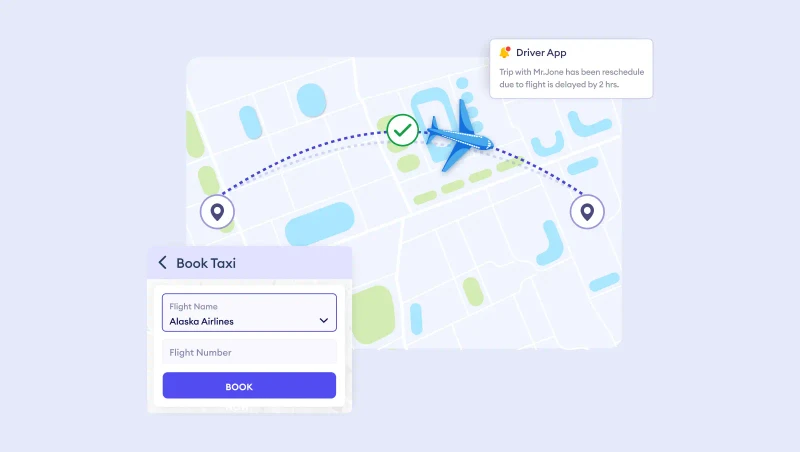
3. Online and Web Booking for Direct Airport Reservations
A web booking system gives passengers, hotels, travel partners and corporate customers a direct way to reserve airport transportation without calling a dispatcher.
For operators, the real value goes beyond customer convenience. Online bookings can enter the same dispatch workflow as bookings created manually or received through partner channels.
A well-designed airport booking flow should capture important journey details before confirmation, including flight information, pickup time, vehicle type, luggage, additional stops and pricing.
For operators trying to grow direct bookings, this reduces repetitive data entry while keeping reservations structured from the beginning.
4. Multi-Stop and Multi-Passenger Transfer Management
Airport transfers do not always follow a simple airport-to-hotel route.
A corporate group may arrive at different terminals, a family may require multiple hotel drop-offs, or a shared transfer may include several scheduled stops.
Multi-stop functionality lets operators build those requirements into a single trip rather than coordinating them through calls and manual driver notes.
Dispatchers should be able to:
-
add or edit pickup and drop-off points
-
calculate the journey around all stops
-
communicate stop details to drivers
-
reflect additional distance or stop charges in pricing
-
keep passengers informed about the planned route
This is particularly useful for corporate travel, hotel transfers, events, group transport and chauffeur services.
5. OTA, Travel Partner and Third-Party Booking Integration
Airport transfer companies frequently receive bookings from several sources: their own website, hotels, travel agencies, corporate clients and external travel platforms.
Without integration, dispatch teams may need to copy these reservations manually into the operating system, increasing the risk of missing or incorrectly entering trip details.
A modern airport transfer management software platform should support structured third-party booking workflows through APIs or supported aggregator integrations.
A typical workflow looks like this:
- A traveler or travel partner creates the reservation.
- Booking data is passed into the transfer system.
- The trip is created in the central booking queue.
- Passenger, flight and journey information becomes available to dispatch.
- The booking proceeds through driver assignment and trip execution.
- Relevant booking or trip status can be returned to the partner where the integration supports it.
For airport transfer operators, the goal of integration is straightforward: more booking channels should not create more manual booking administration.
Yelowsoft currently supports airport-transfer-oriented aggregator and partner integrations including Booking.com, Jayride, HolidayTaxis and others, depending on integration availability and setup requirements.
6. Airport Pricing, Waiting-Time Rules and Payments
Airport transfer pricing often requires more control than a standard distance-based taxi fare.
Operators may need to account for airport zones, vehicle categories, scheduled pickup times, waiting periods, additional stops, night rates or partner-specific pricing.
An airport transportation software platform should therefore allow pricing rules to be configured around the actual service model.
Important capabilities can include:
- fixed airport or route pricing
- zone-based rates
- vehicle-class pricing
- waiting-time charges
- night or peak pricing rules
- partner-specific commissions or rates
- digital payment options
- invoice and receipt generation
Waiting-time management is particularly important for airport work because flight arrival and passenger exit time do not always align with the original pickup schedule.
The objective is to make pricing predictable for the passenger while giving the operator enough control to account for the actual cost of delivering the trip.
7. Automated Driver Assignment and Dispatch Control
Once an airport reservation is confirmed, the next operational challenge is getting the right driver and vehicle to the correct pickup point at the right time.
Airport transfer dispatch software should give dispatchers a central view of upcoming trips, driver availability and live trip status so they can assign or reassign work without relying on calls or spreadsheets.
Depending on the operating model, useful dispatch capabilities may include:
- scheduled driver assignment
- manual reassignment
- driver availability visibility
- vehicle-type matching
- live driver location
- booking status updates
- rules-based or automated assignment
Automation is most valuable when it reduces repetitive coordination while still allowing dispatchers to intervene when flights, drivers or passenger requirements change.
8. Automated Passenger and Driver Notifications
Airport pickups depend on several time-sensitive events, which makes automated communication particularly valuable.
Passengers may need confirmation of their reservation, driver information, pickup instructions or notification that their vehicle has arrived. Drivers may need updates when booking details or arrival conditions change.
With airport transfer automation, notifications can be triggered by events within the booking and trip workflow rather than being sent manually by dispatch staff.
Typical notifications can include:
- booking confirmation
- upcoming-trip reminders
- driver assignment details
- driver-arrival notification
- booking or pickup-time changes
- completed-trip receipts
The objective is not simply to send more messages. It is to make sure the passenger, dispatcher and driver are working from the same trip information at the right stage of the journey.
9. Driver App and Live Trip Execution
Airport transfer operations do not end when a dispatcher assigns the booking.
Drivers need accurate journey information while the transfer is in progress, including pickup instructions, passenger details, navigation context and trip-status actions.
A driver application can connect the control room with the person executing the transfer.
Useful capabilities include:
- upcoming trip details
- passenger and pickup information
- availability management
- navigation
- trip status updates
- driver-to-dispatch communication
- live location visibility
For an airport operator, this creates a continuous workflow from reservation to dispatch to actual trip execution instead of handing the driver a static booking record.
10. Central Operations Dashboard and Reporting
As airport transfer volume increases, operators need more than a booking list. They need visibility into what is happening across upcoming, active and completed trips.
A central operations dashboard should allow teams to monitor:
- scheduled airport bookings
- driver and vehicle availability
- live trip status
- flight-linked reservations
- fare and payment information
- trip history
- operational exceptions
- revenue and driver performance reports
Reporting becomes particularly useful when you want to identify recurring delays, understand booking-channel performance, evaluate fleet utilization or review the profitability of different services.
The value of an airport transfer management software platform comes from keeping these operational signals connected rather than forcing managers to reconcile separate systems.
Meet-and-Greet and Airport Pickup Instructions
Airport pickups often require operational details that are irrelevant to ordinary street-hail trips.
The booking record should be able to carry information such as terminal, meeting point, passenger contact details, name-board instructions, luggage requirements and special pickup notes.
Keeping these details attached to the reservation reduces the risk of information being lost between the booking team, dispatcher and driver.
How to Evaluate Airport Transfer Software Features?
Not every operator needs the same configuration, so feature quantity should not be your only selection criterion.
Before choosing an airport transfer booking system, evaluate how the software handles your real operating workflow.
Ask:
Does it handle flight-linked bookings?
Check how the system captures flight information and what happens when arrival conditions change.
Can it manage advance reservations?
Make sure future bookings remain visible and connected to driver scheduling and dispatch.
Can you configure airport-specific pricing?
Look for fixed routes, zones, waiting-time rules and vehicle-based pricing if these are part of your business model.
Can external booking channels feed into one system?
If you work with hotels, travel agencies or OTAs, understand which integrations are available and how booking changes are handled.
Can dispatchers override automation?
Automation should reduce repetitive work without removing human control when exceptions occur.
What does the driver actually receive?
Check whether drivers have access to the passenger, flight, terminal and trip information required to execute the pickup correctly.
How are failed pickups, delays and exceptions handled?
The real test of airport transfer software is not the normal journey. It is how effectively the system supports operations when the original plan changes.
| Airport Transfer Software Feature | Operational Problem It Addresses | Primary Benefit |
|---|---|---|
| Flight tracking | Uncertain arrival times | Better pickup coordination |
| Advance reservations | Manual future-booking records | Structured trip planning |
| Web booking | Phone/email booking dependency | More direct digital bookings |
| Automated dispatch | Manual driver allocation | Faster assignment |
| Multi-stop trips | Complex group transfers | Easier route coordination |
| Airport pricing | Inconsistent fare calculation | Clearer pricing control |
| Passenger notifications | Repetitive manual updates | Consistent communication |
| Driver app | Information gaps between office and driver | Better trip execution |
| OTA/API integration | Manual re-entry | Centralised bookings |
| Reporting | Limited operational visibility | Better performance analysis |
Real Example: How Fleeyo Digitised Airport Transfer Operations
Fleeyo, an airport transfer operator based in Cambridge, UK, previously relied heavily on manual processes for booking records and driver coordination.
After implementing Yelowsoft, the company introduced an integrated web booking platform and driver application, allowing passengers to book transfers online while drivers could manage availability and accept rides digitally.
According to the published Yelowsoft case study, Fleeyo reported:
- 65% growth in international bookings
- 50% increase in overall trip volume
- 70% faster booking confirmation
- 40% increase in operational capacity
The example shows why airport transfer software is most useful when booking, driver management and dispatch workflows are connected instead of managed independently.
Read the Fleeyo airport transfer case study & explore→ How Fleeyo Transformed from a Local Taxi Service to a Global Airport Transfer Leader
Basic Booking Software vs Airport Transfer Management Software
| Capability | Basic Booking Tool | Modern Airport Transfer Software |
|---|---|---|
| Advance reservations | Usually supported | Connected to dispatch and driver workflows |
| Flight information | Often separate | Linked to airport bookings |
| Driver assignment | Basic/manual | Scheduled, live or rules-based |
| Multi-stop trips | May be limited | Managed within trip workflow |
| Airport pricing | Basic fare calculation | Zone, fixed fare and waiting-time rules |
| Booking channels | Mostly direct | Direct + partner/API integrations |
| Passenger updates | Basic confirmations | Event-driven trip notifications |
| Driver operations | Separate or limited | Driver app connected to bookings |
| B2B accounts | Limited | Hotel, agency or corporate workflows |
| Reporting | Basic | Operational and financial reporting |
When evaluating airport transfer booking software, don't judge the platform only by whether it can accept a reservation. Evaluate whether it connects the reservation to flight coordination, dispatch, driver execution, pricing and billing.
If you want to compare us with other taxi software companies, go ahead and click here.
The Best Airport Transfer Software Features Work as One System
The most important airport transfer software features are not valuable in isolation.
Flight tracking becomes more useful when it informs dispatch. Online reservations become more efficient when they enter the same booking queue. Driver tracking becomes more valuable when dispatchers can connect it to scheduled pickups. Pricing becomes easier to control when airport zones, waiting time and account rules sit inside the same workflow.
That is what you should evaluate when comparing airport transfer booking software in 2026.
Focus less on the total number of features and more on whether the platform connects booking, flight coordination, dispatch, drivers, passenger communication and billing without creating additional manual work.
If you want to see how Yelowsoft connects these workflows, explore its airport transfer software or schedule a product walkthrough with the team.
FAQ's
The most important features typically include flight tracking, advance reservations, driver dispatch, live tracking, airport pricing, waiting-time management, passenger notifications, multi-stop support, payment processing, integrations and operational reporting.
Airport transfer booking software captures reservation details such as journey locations, flight information, passenger requirements and vehicle type, then connects the booking with pricing, driver assignment, passenger communication and trip management.
Flight tracking gives dispatchers visibility into changing arrival conditions so pickup schedules and driver coordination can be adjusted when required.
Airport transfer software typically places greater emphasis on advance reservations, flight-linked pickups, airport pricing, waiting-time rules, terminal information, travel-partner bookings and scheduled driver coordination.
Yes, depending on the system and available integrations. Some platforms use aggregator integrations or APIs to bring external booking data into the central dispatch workflow.
Yes. Airport shuttle booking software can support scheduled reservations, multi-passenger trips, route coordination, driver dispatch, notifications and airport-specific pricing, although operators should verify whether the system supports their shared-ride or fixed-route model.
Ready to Simplify Your Airport Transfer Operations?
See how Yelowsoft’s airport transfer software can fit your operation and support more reliable, scalable airport transfers.